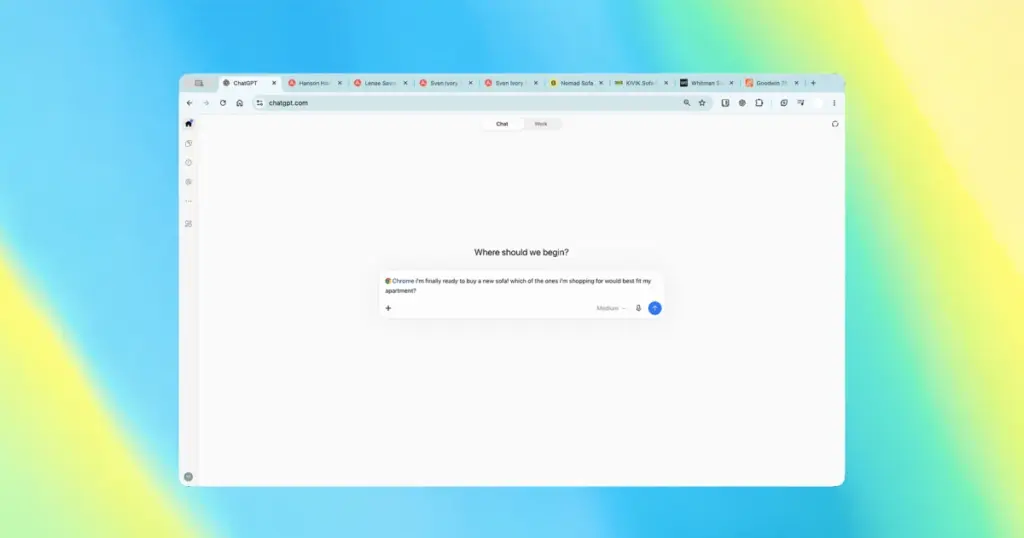
- OpenAI upgraded its official browser extension, allowing ChatGPT to read and process active Google Chrome tabs.
- Users can tag Chrome in the web or desktop interface to let the AI compare information and perform browser tasks.
- The feature is rolling out across all service tiers without requiring separate standalone applications.
Deeper Integration Between ChatGPT and Google Chrome
Following the deprecation of the ChatGPT Atlas browser concept, OpenAI has doubled down on integrating its AI assistant into existing workflows. The official Google Chrome extension has received a major upgrade, granting ChatGPT direct visibility into the user’s currently open tabs.
To utilize the feature, users simply need the official extension installed and must tag Chrome in the ChatGPT desktop or web app. As showcased in a recent demonstration video from OpenAI, this triggers the assistant’s ability to examine page contents directly.
Multitasking and Tab Management Across All Tiers
With this deeper integration, the AI assistant can handle cross-tab data comparisons, extract specific facts from multiple open sources, and perform routine assignments directly across web pages. Furthermore, the integration allows users to hand over degree-level control over their browser tabs to execute tasks automatically.
Importantly, OpenAI confirmed that this capability is not restricted to paid subscribers and is being deployed across all existing subscription tiers.
Research, shopping, and data synthesis become far more seamless, eliminating manual copy-pasting by letting the AI inspect multiple live browser tabs simultaneously on command.


Being able to compare data across active tabs without endless copy-pasting sounds like a massive workflow boost. I wonder how it handles dynamic content like infinite scroll or gated pages behind logins? Also curious if anyone has tested its impact on memory and browser performance with heavy multitasking.