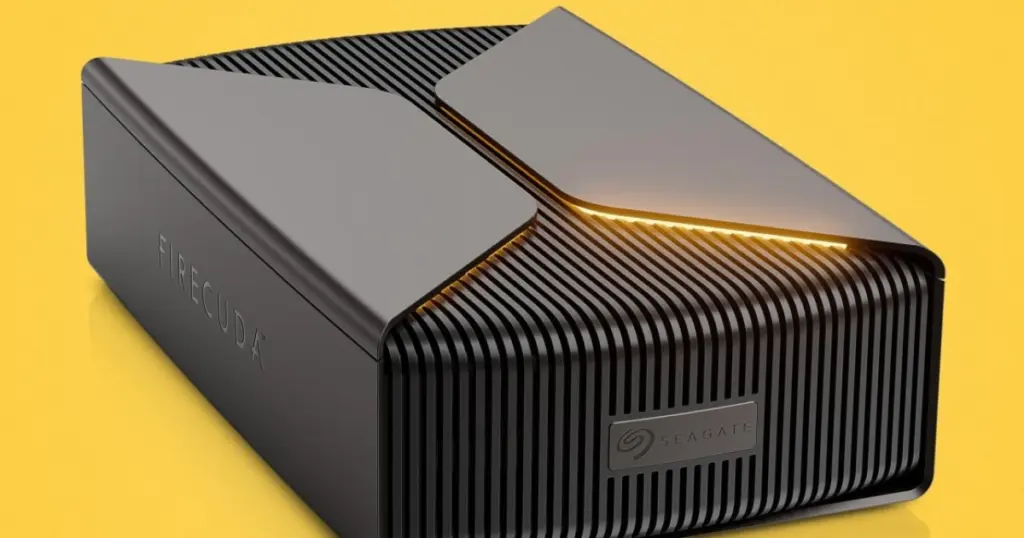
- Seagate introduced the FireCuda Forge, an external storage solution combining high-capacity HDD with a user-supplied M.2 NVMe SSD.
- It leverages the new Alkemi intelligent storage platform to automatically manage data, moving frequently accessed files to the faster SSD.
- Available in 8TB and 20TB capacities starting at $699, requiring users to install their own SSD.
Seagate Unveils FireCuda Forge: A New Era for Hybrid Storage
Seagate has launched the FireCuda Forge, an external storage solution designed to merge the high-speed benefits of solid-state drives (SSDs) with the cost-effectiveness of large-capacity hard disk drives (HDDs). This move marks Seagate’s re-entry into hybrid storage, empowering users to install their own M.2 NVMe SSDs for enhanced performance.
Introducing the Alkemi Intelligent Storage Platform
At the core of the FireCuda Forge is Seagate’s new Alkemi intelligent storage platform. This technology dynamically caches and prioritizes data by observing workloads and relocating frequently used or currently relevant files to the faster, user-supplied SSD. Alkemi adapts over time to user behavior, eliminating the need for manual management of separate drives. Seagate clarifies that while Alkemi employs machine learning, it does not utilize generative AI.
Specifications and User Requirements
The FireCuda Forge is available in 8TB and 20TB capacities. A key characteristic is the requirement for users to supply and install their own M.2 2280 NVMe SSD. The drive supports PCIe Gen3 and higher SSDs, with a recommended maximum capacity of 1TB and the inclusion of DRAM cache. The combined system boasts claimed performance of up to 2500 MB/s read and 2000 MB/s write speeds. It features a USB4 interface and is compatible with Windows 11 and macOS 26+.
| Specification | Seagate FireCuda Forge |
|---|---|
| HDD Capacity | 8TB, 20TB |
| Required SSD | M.2 2280 NVMe (PCIe Gen3+, up to 1TB, with DRAM) |
| Max Stated Speed | Read: 2500 MB/s, Write: 2000 MB/s |
| Interface | USB4 |
| Compatibility | Windows 11, macOS 26+ |
| Price (without SSD) | 8TB: $699, 20TB: $899 |
Installation and Design Considerations
Installing an SSD into the FireCuda Forge involves partially disassembling the enclosure by removing four screws from the bottom. The M.2 drive bay is clearly visible on the side. The package includes two thick thermal pads to aid in heat dissipation for the SSD, though the internal surfaces are primarily plastic. The FireCuda Forge’s design is similar to the FireCuda X Vault HDD, complete with gamer-friendly RGB lighting. It requires an external power adapter and a USB-C cable, as powering both a 3.5-inch HDD and an M.2 SSD draws significant power.
Preliminary Performance Insights
Initial benchmarks suggest that the FireCuda Forge significantly outperforms traditional hard drives in read and write speeds, largely due to its USB4 interface. In PCMark 10 Storage Benchmark and DiskBench tests, the Forge demonstrated strong results, though dedicated external SSDs like the SanDisk Desk Drive naturally showed higher performance. However, for 8TB and 20TB capacities, where all-SSD solutions are considerably more expensive or non-existent, the FireCuda Forge presents a compelling alternative. This focus on performance optimization could be crucial for users, akin to how Valve enhances game performance transparency through detailed statistics.
Pricing and Final Thoughts
The Seagate FireCuda Forge is priced at $699 for the 8TB model and $899 for the 20TB option. These prices do not include the required M.2 SSD, which must be purchased separately. Considering the cost of a suitable SSD, the total investment for a FireCuda Forge setup might approach that of some smaller-capacity, dedicated external SSDs. This solution is most attractive for users who need vast storage capacities, especially the 20TB variant where consumer-grade single-drive SSD options are unavailable, combined with improved performance for frequently accessed data.
For users, the FireCuda Forge represents a new external storage paradigm, offering a balance between the immense capacity of an HDD and the speed of an SSD. It is particularly well-suited for individuals managing large datasets who also require rapid access to specific files, such as for gaming, video editing, or other demanding applications. The user-supplied SSD model provides flexibility in drive choice but also necessitates some technical proficiency and an additional investment.


The Alkemi caching concept is fascinating, especially letting users drop in their own NVMe drive. How does it handle write endurance over time if heavy workflows keep shifting data back and forth? Also, I wonder if a 2TB SSD would work at all or if the firmware strictly caps caching to 1TB.