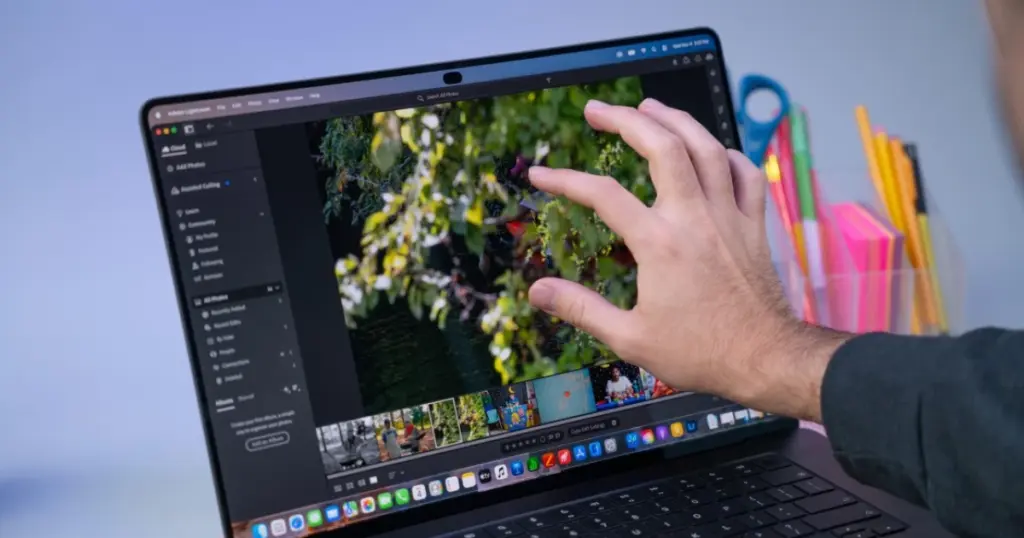
- Apple has launched a revamped MacBook Pro featuring the PROLED XDR Display, bringing OLED technology and touchscreen functionality to the Mac platform for the first time.
- New models boast a significantly lighter design, thinner bezels, a glowing Apple logo, and the Dynamic Island replacing the traditional notch.
- Pricing starts at $2899 for the 14-inch model and $3399 for the 16-inch, representing a $400 premium over existing Liquid Retina versions.
Apple MacBook Pro with PROLED XDR Display: A New Era for Mac
Apple has unveiled its latest MacBook Pro lineup, featuring the highly anticipated PROLED XDR Display, marking a significant evolution for the Mac platform. This release introduces two long-requested features: OLED screen technology and touchscreen capabilities, alongside the integration of the Dynamic Island, previously exclusive to iPhones.
Design and Ergonomics: Lighter, Thinner, Yet Familiar
From a distance, the new MacBook Pro models retain a familiar aesthetic, available in the same space black and silver finishes. However, the shift to an OLED panel has allowed for a slightly thinner profile; the 16-inch review unit measures 16 mm, a reduction of 0.8 mm. More notably, the weight has been significantly reduced: the 16-inch model with M5 Max chip now weighs 4.1 pounds (1.84 kg) compared to 4.7 pounds (2.13 kg) for the Liquid Retina versions, while the 14-inch drops from 3.5 pounds (1.59 kg) to 3 pounds (1.36 kg). This makes the new MacBook Pros lighter than some competitors, such as Microsoft’s Surface Laptop Ultra (4.4 pounds) and Lenovo Pro 9n (3.64 pounds).
A nostalgic design element returns with the glowing Apple logo on the lid, a feature absent for many years. The display now sports thinner bezels and rounded corners on all four sides, expanding the 16-inch model’s diagonal to 16.3 inches (from 16.2 inches). The traditional notch has been replaced by the Dynamic Island, which intelligently displays system alerts, notifications, and ongoing activities, and even indicates mouse pointer location when it moves behind the camera area.
Port selection remains consistent: three Thunderbolt 5 (USB-C) ports, a 3.5 mm headphone jack, an SD card reader, HDMI output, and MagSafe 3. While the hinge feels sturdier, it still exhibits some wobble with touch interaction and does not offer a 180-degree flat mode for drawing, a feature still reserved for the iPad.
PROLED XDR Display: A Visual Masterpiece
The PROLED XDR Display is the centerpiece of this update, marking Apple’s first implementation of tandem OLED technology in a Mac. This screen delivers stunning visuals with deep blacks, vibrant colors, and intense brightness. Our 16.3-inch review unit featured a 3472×2266 native resolution, 254 PPI, a variable refresh rate of 10-120 Hz with ProMotion, and, of course, touch support.
In SDR brightness tests, the display achieved 542.6 nits. For HDR content, it peaked at an impressive 1,964 nits in our 40% HDR test. Color gamut measurements showed 83.6% DCI-P3 volume and 118% sRGB. While some competitors might show higher numbers in specific metrics, the PROLED XDR’s overall visual quality is lauded as superior, offering a noticeable improvement over Mini-LED panels.
Display Specifications Comparison
| Feature | MacBook Pro PROLED XDR | Surface Laptop Ultra (Mini-LED) | Lenovo Pro 9n (OLED) |
|---|---|---|---|
| Display Type | 16.3-inch Tandem OLED | Mini-LED | OLED |
| Resolution | 3472×2266 | N/A | N/A |
| SDR Brightness | 542.6 nits | 944 nits | N/A |
| Peak HDR Brightness (40%) | 1964 nits | N/A | N/A |
| DCI-P3 Color Gamut | 83.6% | N/A | Most vivid |
| sRGB Color Gamut | 118% | N/A | Most vivid |
| Touch Support | Yes | N/A | N/A |
| ProMotion (VRR) | 10-120 Hz | N/A | N/A |
Apple also provides an expanded array of reference modes, including standards for video, cinema, web, photography, and DICOM medical imaging, alongside advanced calibration tools.
Dynamic Island and macOS Touch Features
Beyond OLED, the Dynamic Island significantly enhances the screen experience. It effectively replaces the notch, providing a dynamic area for system alerts and ongoing activities. While Face ID is still absent, the Dynamic Island offers improved interaction with macOS Golden Gate 27.2, including visual feedback for mouse pointer location.
The addition of touchscreen functionality is a long-awaited feature for the MacBook Pro. However, its current implementation does not radically alter the laptop’s ergonomics. Users seeking a tablet-like experience for drawing or extensive touch interaction may still find the iPad a more suitable option.
Pricing and Availability
The new MacBook Pro models with PROLED XDR Display come at a higher price point. 14-inch systems start at $2899, while 16-inch models begin at $3399, representing a $400 increase over Liquid Retina versions with identical chips. A fully configured 16-inch model with M5 Max, 128GB RAM, and 2TB SSD can reach $7399.
For more insights into Apple’s broader ecosystem and financial performance, see our recent coverage: Apple Q4 Earnings Revealed, iOS 27.3 Beta 1 Released, and MacBook Neo 2 Rumors Emerge.
The introduction of OLED and touchscreen capabilities in the MacBook Pro marks a significant evolution for Apple, aligning the Mac closer to the iPad’s display functionality. While the premium pricing is substantial, users gain access to arguably the best laptop display on the market, coupled with improved portability due to weight reduction, and an enhanced user interface through the Dynamic Island. This makes the MacBook Pro with PROLED XDR Display a compelling choice for professionals prioritizing display quality and performance, even if the touchscreen remains a secondary interaction method rather than a core ergonomic shift.


While the new PROLED XDR Display and touchscreen sound appealing, I’m curious about the long-term durability and potential for burn-in with OLED on a productivity machine. Also, the $400 premium is significant, and I wonder if the real-world benefits of the Dynamic Island and touch on macOS truly justify that extra cost, especially given the hinge still wobbles and doesn’t lay flat. It feels like a substantial investment for features that might not be fully optimized for the desktop workflow just yet.