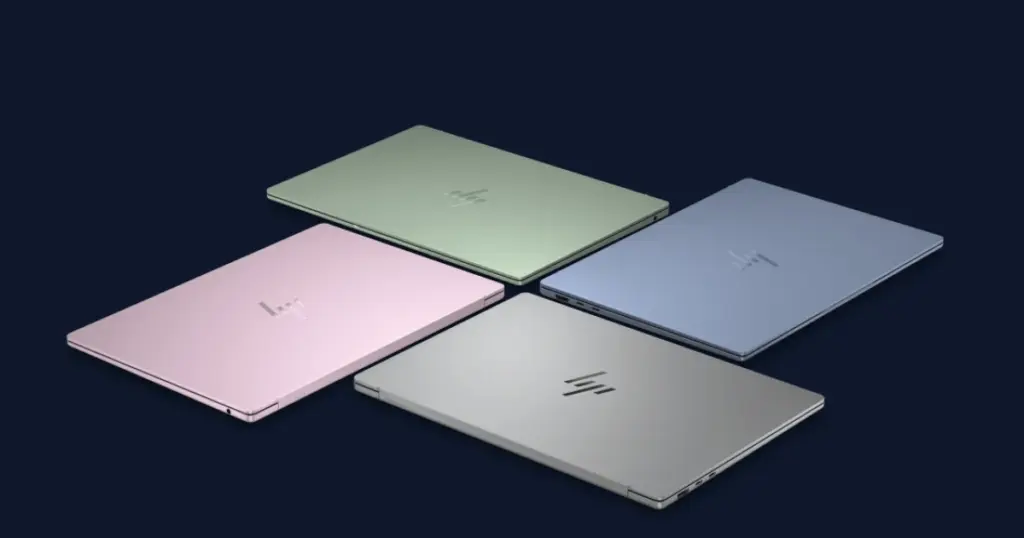
- HP has officially announced the HP OmniBook 5, a new premium laptop designed to directly compete with Apple’s MacBook Neo.
- The 2026 HP OmniBook 5 14 starts at $699.99, featuring an Intel Core 5 315 “Wildcat Lake” processor, 8GB of RAM, and a 256GB SSD.
- A key highlight of the HP OmniBook 5 is its vibrant OLED display, promising superior visual clarity and color reproduction.
HP Unveils Premium Laptop Targeting Apple’s Dominance
HP has officially announced the HP OmniBook 5, a new premium laptop designed to directly compete with Apple’s MacBook Neo. Positioned as a versatile device for general consumers and small to medium-sized businesses, this new offering boasts a sleek, lightweight aluminum chassis combined with robust performance and impressive battery longevity.
Performance and Configuration Details
The 2026 HP OmniBook 5 14 starts at $699.99, featuring an Intel Core 5 315 “Wildcat Lake” processor, 8GB of RAM, and a 256GB SSD. Higher-end configurations are available with up to an Intel Core 7 350 processor, clocking at up to 4.8 GHz, complemented by up to 16GB of LPDDR5-6400 RAM and an NVMe M.2 PCIe 4.0 SSD with capacities up to 1TB. Weighing from just 1.16 kg, the OmniBook 5 stands out as a remarkably portable option.
Display and User Experience Enhancements
A key highlight of the HP OmniBook 5 is its vibrant OLED display, promising superior visual clarity and color reproduction. The laptop also includes a backlit keyboard, enhancing usability in various lighting conditions. HP claims an impressive battery life of up to 42 hours, making it an attractive choice for users requiring extended unplugged operation.
Broader Product Portfolio Expansion
In addition to the OmniBook 5, HP also introduced the HP ProBook 4, a laptop specifically tailored for the needs of small and medium-sized businesses, underscoring the company’s commitment to diverse market segments.


I’ve been using the OmniBook 4 for a while now, and the battery life is genuinely impressive, often exceeding 35 hours on light usage. The OLED display is stunning for media consumption, but I’ve found that the color accuracy can drift slightly after a few months, requiring recalibration. My biggest gripe is the trackpad; it’s responsive but sometimes registers accidental clicks near the edges. A practical tip: disable the adaptive brightness, it can be a bit too aggressive in changing light conditions.