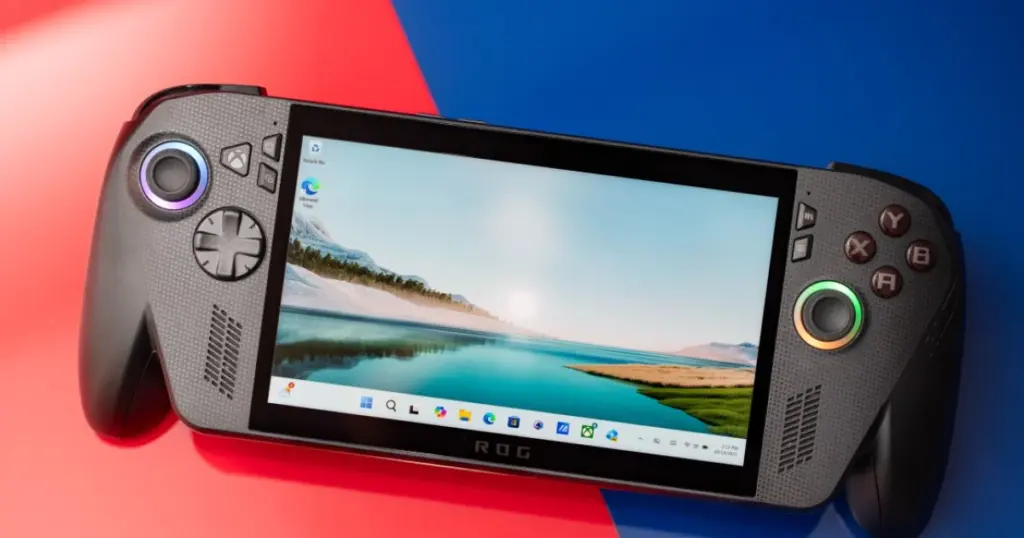
- Microsoft has officially launched Automatic Super Resolution (Auto SR), an upscaling technology competing with Nvidia’s DLSS.
- The feature is now available for Asus ROG Ally X, Ally X20 handhelds, and select Windows Copilot+ PCs.
- Auto SR now supports handheld mode, 1080p gaming, and can achieve up to 120 frames per second in Performance Mode.
Microsoft Launches Auto SR: DLSS Competitor Now Available on Handhelds
Microsoft has officially announced the full rollout of its Automatic Super Resolution (Auto SR) technology, designed to compete with upscaling solutions like Nvidia DLSS and AMD FSR. Following months of testing, Auto SR is now available for the Asus ROG Ally X and Asus ROG Ally X20 handheld gaming consoles, as well as for select Windows Copilot+ PCs.
Previously, since April, Auto SR was accessible only through Preview versions of Windows and required the handheld device to be in docked mode. These restrictions have now been lifted, allowing ROG Ally X and X20 users to activate the feature in handheld mode, utilizing the device’s internal battery.
New Features and Advantages of Auto SR
The official release of Auto SR brings several significant improvements and new functionalities:
- Handheld Mode: The ability to use Auto SR without a dock, greatly expanding its use cases for portable consoles.
- 1080p Support: The technology can now be applied to games running at 1080p resolution.
- Increased Frame Rates: A new ‘Performance Mode’ allows Auto SR to achieve up to 120 frames per second, an increase from the previous maximum of 60 or 75 fps.
- Auto HDR Integration: Support for Auto HDR in compatible games.
A key differentiator for Auto SR is its utilization of the Neural Processing Unit (NPU). This offloads upscaling tasks from the Graphics Processing Unit (GPU), freeing up the GPU for other computational work. This can potentially offer better performance compared to FSR in games that lack native FSR integration or where FSR implementation is suboptimal.
Auto SR Mode Comparison
| Feature | Preview Auto SR | Official Auto SR |
|---|---|---|
| Availability | Windows Preview versions only | Main Windows OS |
| Operation Mode | Docked mode only | Docked and handheld mode |
| Supported Resolution | Not specified | Including 1080p |
| Max Frame Rate | Up to 60/75 FPS | Up to 120 FPS (Performance Mode) |
| NPU Utilization | Yes | Yes |
While FSR remains a preferred option where well-implemented, Auto SR provides a valuable alternative, especially for games without built-in FSR support. The use of the NPU for upscaling is a significant advantage, enabling handheld devices like the ROG Ally X to effectively boost frame rates. The broader trend of leveraging AI in hardware, as seen with NPU-powered solutions, continues to enhance device capabilities across various sectors.
Expanded Availability and Future Outlook
Beyond the Asus ROG Ally X and X20, Microsoft has confirmed that Auto SR will be available for “select Windows Copilot+ PCs.” This indicates a broader rollout of the technology across the Windows ecosystem, particularly on NPU-equipped devices, aligning with Microsoft’s overall strategy for AI integration. This expansion underscores the growing importance of AI in enhancing user experience and hardware performance.
For owners of the Asus ROG Ally X and Ally X20, the official launch of Auto SR signifies a substantial enhancement to their gaming experience. They can now enjoy higher frame rates and improved image quality in handheld mode, without relying on games having built-in FSR support. This makes these portable consoles even more versatile and powerful, especially when maximizing hardware efficiency is crucial.


I’ve been using Auto SR on my Ally X since the preview, and it’s a game-changer for battery life in handheld mode. The performance uplift is noticeable, especially in titles that don’t have FSR built-in. I’ve found it works best when you’re already hitting around 40-50 FPS natively; pushing it from, say, 25 FPS to 60 FPS often introduces too much visual artifacting for my taste. My tip: try it with slightly older or less demanding games first to see how it enhances your experience without overdoing it. It’s not a magic bullet for every scenario, but it definitely helps extend play sessions.