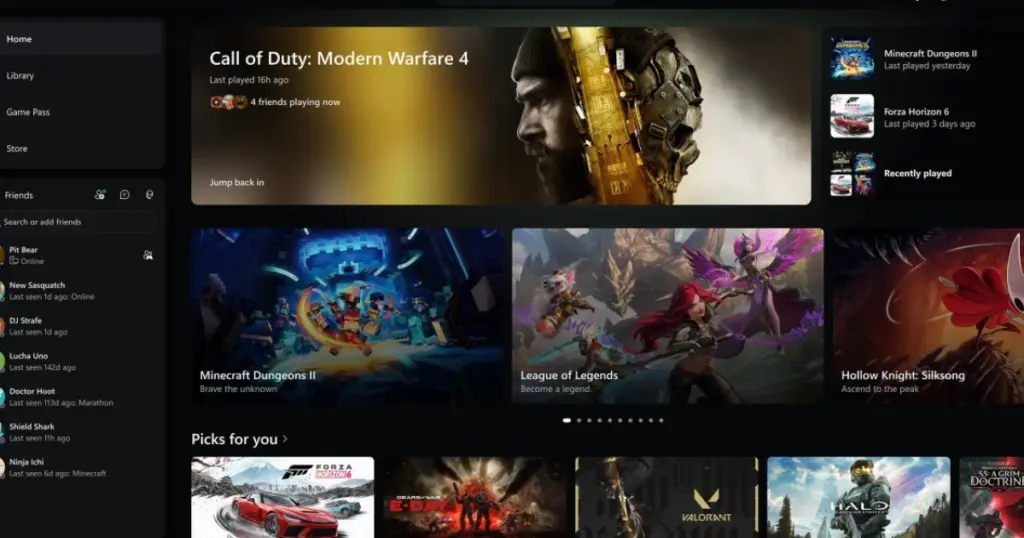
- Microsoft has rolled out an updated Xbox PC app that launches up to 60% faster with a redesigned user interface.
- Xbox Cloud Gaming on the web, smart TVs, and VR headsets also received an overhaul, featuring simpler navigation and improved search.
- These performance and design enhancements are currently available for testing by Xbox Insiders.
Microsoft Boosts Xbox PC App Speed and Redesigns Cloud Gaming Experience
Microsoft has announced significant updates to its Xbox PC application and the Xbox Cloud Gaming service. The primary focus of these enhancements is a substantial increase in performance and a comprehensive redesign of the user interface, aiming to deliver a more fluid and engaging user experience across the platform.
Accelerated Performance for the Xbox PC App
According to internal company tests, the refreshed Xbox PC app now launches up to 60% faster than its predecessor. This improvement is part of a broader optimization effort that extends to various components within the application.
| Component | Speed Improvement | Conditions |
|---|---|---|
| App Launch | Up to 60% faster | Depends on device, internet connection, system configuration |
| Page Loading (Home, Store, Game Pass) | Up to 50% faster | Depends on device, internet connection, system configuration |
| In-app Window Opening | Up to 65% faster | Depends on device, internet connection, system configuration |
Beyond the initial launch, key pages such as Home, Store, and Game Pass now load up to 50% faster, while in-app windows open up to 65% quicker. These performance metrics are subject to variation based on factors including the user’s device, internet connection, system configuration, and usage patterns.
Redesigned Interface and Enhanced Features
The updates are not limited to speed; they also introduce a significant overhaul of the user interface. The redesign focuses on simpler navigation, updated filters, and new ways to organize games. For instance, library navigation has been streamlined, search capabilities have been improved, and friends and social features are now integrated directly into the main navigational window, enhancing accessibility.
Xbox Cloud Gaming Interface Overhaul
In parallel with the PC app, Microsoft has refreshed the interface for Xbox Cloud Gaming, which is accessible via web browsers, smart TVs, and virtual reality headsets. Such platform enhancements are crucial for maintaining competitiveness in the evolving landscape of gaming services.
A “refreshed Xbox web experience” is also underway, promising an improved library tab, more efficient use of screen space, and support for light, dark, and high-contrast visual modes.
Availability
These comprehensive updates are currently being rolled out to participants in the Xbox Insiders program for testing. Users wishing to access these new features will need to install the Xbox Insider Hub.
For Xbox users, these updates translate into a significantly faster and more user-friendly experience when accessing games and platform features, particularly for those who frequently utilize the PC app or cloud gaming service. The simplified navigation and enhanced social functionalities are likely to increase player engagement, making the Xbox ecosystem more appealing and competitive against other gaming launchers. For Microsoft, this represents a strategic move to improve user satisfaction and strengthen its position in the PC gaming and cloud solutions segments.



I’ve been using the Insider build for a couple of weeks now, and the speed improvements are genuinely noticeable. Launching the app feels snappier, and navigating Game Pass is much smoother. The new UI for Cloud Gaming on my browser is also a big step up, making it easier to jump into games. My only gripe is sometimes the friends list still takes a second to fully load, but it’s much better than before. Pro tip: make sure your Windows is fully updated; I noticed a slight performance bump after the latest OS patch.