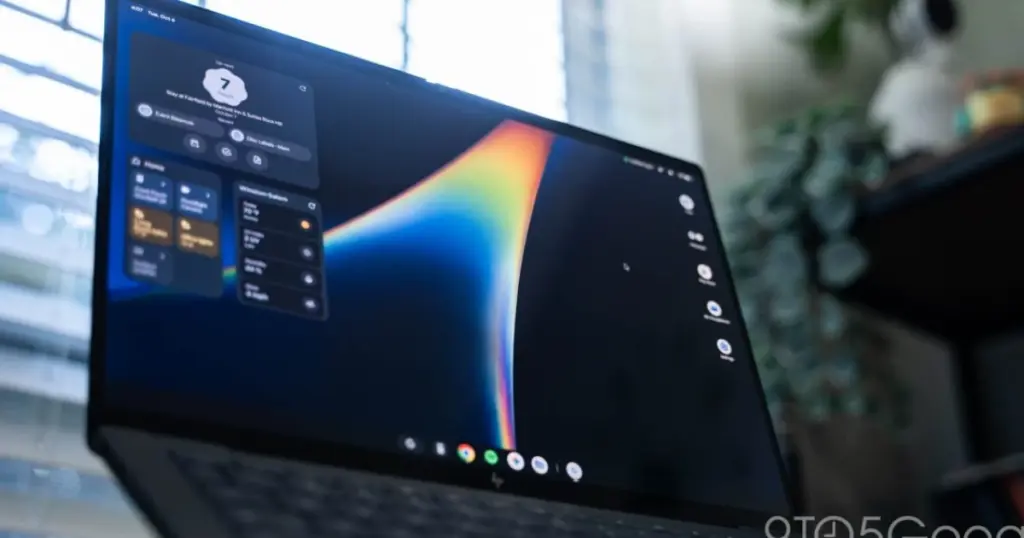
- Google and partners have launched Googlebooks, a new PC category running an Android-derived desktop operating system called Googlebook OS.
- Initial laptops from Dell, HP, and Lenovo feature premium OLED screens and modern Snapdragon X Elite or Intel Panther Lake chips, delivering 10–12 hours of battery life.
- Software limitations hinder the experience, including lack of multiple Chrome profiles, a locked-down Play Store, and touch-first interface scaling.
A Bold Push Beyond Traditional Chromebooks
Bridging mobile interfaces with traditional desktop productivity has challenged tech giants for over a decade. With Googlebook OS, Google is shifting away from the lightweight, browser-first image of ChromeOS to position its new machines as direct competitors to macOS and Windows laptops. The initiative launches with five major hardware partners: Dell, Lenovo, HP, Acer, and Asus.
Independent hands-on evaluations of three inaugural models—the Lenovo Googlebook 15, HP Googlebook 14, and Dell XPS Googlebook—confirm that while hardware execution is refined, the underlying software is not yet mature enough for power users.
Hardware Breakdown: Displays, Glowbar, and Processing Power
The first wave of Googlebooks closely mirrors established Windows chassis designs. The HP Googlebook 14 derives its frame from the OmniBook Ultra, while the Dell XPS Googlebook replicates the minimalist XPS 13 layout with an updated haptic trackpad. Lenovo opted for an ultra-lightweight 2.84-pound build using magnesium, aluminum, and carbon fiber.
Across all devices, Google has instituted a uniform aesthetic: the Glowbar light strip on the exterior lid. Originating on the Chromebook Pixel, the LED bar signals battery charge statuses, animates during Gemini interactions, and features a hidden “Glowbar Disco” customization menu. Keyboard layouts are equally standardized, adding a dedicated “G” key, a Quick Insert function mapped to Caps Lock, and dedicated Android-style navigation keys (F1–F3).
Hardware Specifications and Test Results
| Laptop Model | Processor Platform | Display Specs | Battery Life (Web Loop) |
|---|---|---|---|
| Lenovo Googlebook 15 | Intel Core Ultra 5 325 (Series 3) | 15.3″ OLED (2880 x 1800) | 11 hrs 52 mins |
| HP Googlebook 14 | Qualcomm Snapdragon X Elite X1-80-100 | 14″ OLED (2880 x 1800) | 10 hrs 25 mins |
| Dell XPS Googlebook | Qualcomm Snapdragon X Elite X1-80-100 | 13.4″ LCD (2560 x 1600) | 10 hrs 04 mins |
Benchmark data reveals that the Snapdragon X Elite models led in multi-core Geekbench 7 testing and 3DMark Steel Nomad Light graphic benchmarks, whereas Lenovo’s Intel platform took the lead in WebXPRT4. Furthermore, system diagnostics indicate that 7 to 8 GB of the standard 16 GB minimum RAM remains permanently reserved, presumably to keep local on-device AI models active in memory.
Current Shortcomings of Googlebook OS
Despite offering deep mobile ecosystem ties, Googlebook OS frequently exposes its Android smartphone origins in ways that clash with professional desktop workflows:
- Locked App Distribution: Software installation is entirely restricted to Google Play, preventing direct web downloads. The ecosystem relies heavily on mobile adaptations found across Google Play app deals rather than native desktop suites.
- Unrefined File Navigation: The native Files application lacks basic forward and back navigation buttons and forbids folder rearrangement in the sidebar.
- Single-Profile Chrome: Unlike desktop ChromeOS or macOS, Google Chrome on Googlebook OS currently lacks multi-profile support, complicating separate management of personal and corporate accounts.
- Architecture Discrepancies: The Intel-powered Lenovo encountered app crashes and taskbar icon glitches with certain applications, such as Microsoft Edge, highlighting early translation friction on x86 chips.
Googlebooks demonstrate impressive industrial design and seamless phone integration for Android enthusiasts, but the operating system still feels half-baked. Until Google refines window management, file navigation, and multi-profile browsing, it remains a browser-centric device rather than a true full-fledged PC replacement.


I’ve been using the HP 14 for a week now. The hardware and battery life are genuinely stellar, but the lack of Chrome profile switching completely broke my daily workflow. If you pick one up, definitely enable developer options right away to force desktop mode on stubborn mobile apps; it makes multitasking significantly less painful.